CNBC金融新闻精听

And Berry,you sound more upbeat on the market and the prospects of the economy, then the last few times we’ve spoken.What’s changed?
Well, the biggest thing that’s changed is the market doesn’t seem to think that there’s anything to hold it back
… that the Federal Reserve (is) doing what it’s doing; the stimulus has been pouring out.
I would say that we are gonna see some volatility. It’s not that I don’t think that that exist.
But it’s more of a rotation than anything else. The rotation to small, to cyclicals, we like names like Caterpillar on the infrastructure side.

upbeat on/about sth. upbeat乐观的
the prospects for sth. 对某事的展望
hold it back 拖住
Federal Reserve 美联储 (monetary policy ,fiscal policy,interest rate)
stimulus 刺激;激励
pouring out 涌出
volatility 动荡
rotation 资金轮转
small-cap(capitalization) stocks
cyclicals 周期性股票
caterpillar 毛毛虫;此处指美建材公司名

Inauguration of President Joe Biden was orderly and uneventful, removing at least a modest level of apprehension among some investors, though in fact, the market has been rather unflappable in general since late October. Attention turns now to whether the universally expected fiscal spending boost and vaccine-aided economic revival occur on time to the satisfaction of investors who’ve been positioning for this exact scenario to unfold for more than two months.

orderly 有条不紊的
uneventful 没什么事发生的,比较平静的
modest 适度的 a modest level of sth.
apprehension 担忧;理解
flap v. 激动不安
unflappable 镇定的
in general 大体上
universally expected 全民期待的 拓展:adv.+adj./done. universally true/accepted
fiscal spending 财政支出
boost 刺激
vaccine-aided 被疫苗帮助的;拓展:mite-infested disease 被螨虫感染的疾病
revival n. 复苏 revive v. 复苏
to the satisfaction of 为了满足……的期待
position– To buy or sell securities in order to establish a net long or a net short position.
have been positioning 一直在做准备
scenario 情境(还没有成真的事)
unfold发生

The record-low supply of homes for sale right now has buyers outbidding each other. Some homes are going for far more than their listed, but only if they have what today’s buyer wants. January isn’t usually a hot time for housing. But the pandemic has upended everything, even seasonality. This house, which was beautifully staged, sold in a matter of days. And another one, also-well staged down the block, went on the market last weekend and by Tuesday had eight offers.

record-high/low 历史新高/低
for sale 待售 (usually by or on behalf of the owners)
on sale– esp. of goods in shops
outbid sb. 出价高过别人
bid (a price) for sth.
have sb doing sth.–cause sb to do
have sb do–arrange for sb to do
go for something–to be sold for a particular amount of money
eg. We expect the house to go for about £200,000.
listed 原文中指listed price or listing price
today‘s buyer 群体
a hot time 旺季
housing 住房市场
the pandemic 此处特指新冠(流行病)
upend 颠倒
seasonality 季节性
stage 为了把房子卖出去重新装修
in matter of 至多,还不到
block 路口
down the block 沿着街区这条路往下走
offer 出价

Private payrolls drop by 123,000 in December.
That breaks a 7-month spree of job growth.
So we need to watch this very carefully and see whether or not that drop in hiring is reflected in the overall government figures when they come out.
Tesla got a price target upgrade today at Morgan Stanley.
They think those shares could climb to $810 per share.
We will keep you posted.
I’m Sue Herera, CNBC business news.

payroall n. 企业工资单;工资券;通常代指企业人数
private payrolls->private non-farm payroll 排除政府所有非营利企业后的就业人数
spree n.狂欢 e.g.:shopping spree
is reflected in sth.
a price targe upgrade 股票目标价格上涨
share [economy] 股份
keep sb. posted =keep sb. updated=keep sb.abreast【使某人不断获得某件事最新的发展】

Hi, everybody, I’m Sue Herral, Cnbc business news.
The Dow hit a record high, the Russel 2000 did as well today.
They are watching the Georgia election’s Democratic control of the Senate. If indeed that does happen, under a Biden administration, it may mean more stimulus checks coming for individuals and small businesses. And the market views that as very bullish. We don’t know however, how that Georgia election has turned out yet.

The Dow/Dow Jones -> Dow Jones Industrial Average 道琼斯工业平均指数
Russel 2000 Index
the Geogia election 乔治亚州选举
bullish n.牛;(特指)公牛;这里指牛市的;利好的 牛市->bull market(bullish market)
views sth.as… 把某事看作是什么样的
turn out 出结果
the Senate参议院

Legislative (makes laws)立法机关
|——Congress 国会
|——Senate 参议院
|——House of Representatives 众议院
Executive (carries out laws)行政机关
|——President 总统
|——Vice President 候选总统
|——Cabinet 内阁
Judicial (evaluates laws)司法机关
|——Supreme Count 最高法院
|——Other Federal Counts 其他联邦法院
000-布局-伪元素-CSS3动画-实战

CSS Spotlight 文字动画效果解析

![spotlight] (../../images/spotlight.jpg)

效果分层

  1. 简单的结构样式搭建:使用Flex布局实现居中显示
  2. 用伪元素快速复制图层:创建文字副本用于特效处理
  3. 用background-clip制造出彩虹文字background-clip: text 实现渐变文字
  4. 用clip-path制作灯光效果clip-path 创建动态灯光效果

完整代码实现

HTML结构

1
2
3
4
5
6
7
8
9
10
11
<!DOCTYPE html>
<html lang="en">
<head>
<meta charset="UTF-8">
<title>002</title>
<link rel="stylesheet" href="index.css">
</head>
<body>
<h1>SPOTLIGHT</h1>
</body>
</html>

CSS样式

1
2
3
4
5
6
7
8
9
10
11
12
13
14
15
16
17
18
19
20
21
22
23
24
25
26
27
28
29
30
31
32
33
34
35
36
37
38
39
40
41
42
43
44
45
46
47
48
49
50
51
52
53
54
55
56
57
58
59
60
61
62
63
64
65
66
67
68
69
70
71
72
73
74
75
76
/* 清除页面中的margin和padding */
* {
margin:0;
padding:0;
}

body {
background:#222;

/* flex布局:body元素采用flex布局后,它变为flex容器 */
display:flex;
/* 设置容器的属性justify-content,定义横向对齐方式,属性值为center居中 */
justify-content: center;
/* 设置容器的属性align-items,定义纵向对齐方式,属性值为center(交叉轴的中点对齐) */
align-items: center;

/* CSS尺寸(Dimension)属性,min-height设置元素最小高度 */
/* CSS长度单位,这里vh是视窗高度(viewpoint height),1vh=视窗高度的1%,即占用100%的当前浏览器视窗高度 */
min-height: 100vh;
}

h1 {
color:#333;
/* 调字体大小,这里要注意em\rem的区别 */
/* 这里rem作用于非根元素,相对于的是根元素字体大小(font-size),所以为html默认的16px*8=128px */
/* 如果是作用于根元素html,相对于原始大小(16px),所以html的font-size为16px*i */
font-size:8rem;
/* position属性 */
/* 作为flex成员,当前元素居中显示,且这里将相对定位元素作为了绝对定位元素的容器块 */
position:relative;
}

/* 伪元素 */
/* :after是CSS选择器,这里指在每个<h1>元素之后插入内容 */
h1:after {
/* content 属性与 :before 及 :after 伪元素配合使用,来插入生成内容 */
content:'SPOTLIGHT';
/* transparent是全透明黑色(black)的速记法,即一个类似rgba(0,0,0,0)这样的值 */
color:transparent;
/* 采用绝对定位,相对于最近的已定位父元素,这里就是相对于<h1>上部和左部都不偏移 */
position:absolute;
left:0;
top:0;

/* 语法--background-image: linear-gradient(direction, color-stop1, color-stop2, ...); */
background: -webkit-linear-gradient(left,#d43f3a,#f0ad4e,#f7ecb5,#5cb85c,#66afe9,#2e6da4,#761c19);

/* background-clip: border-box|padding-box|content-box;设置元素的背景(背景图片或颜色)的填充规则 */
/* border-box:默认值。背景绘制在边框方框内(剪切成边框方框) */
/* padding-box:边框下面没有背景,即背景延伸到内边距外沿 */
/* content-box:背景剪裁到内容区外沿 */
/* text:目前只有chorme支持,意思是,以区块内的文字作为裁剪区域向外裁剪,文字的背景即为区块的背景,文字之外的区域都将被裁剪掉 */
-webkit-background-clip:text;

/* clip-path属性使用裁剪方式创建元素的可显示区域。区域内的部分显示,区域外的隐藏 */
/* <circle()> = circle( [ <shape-radius> ]? [ at <position> ]? ) */
/* circle()可以传2可选参数:1、圆的半径,默认元素宽高中短的那个为直径,支持百分比;2. 圆心位置,默认为元素中心点 */
clip-path: circle(100px at 0% 50%);

/* CSS3动画 */
animation: light 5s infinite;
}

/* @keyframes 规则是创建动画 */
/* @keyframes 规则内指定一个 CSS 样式和动画将逐步从目前的样式更改为新的样式 */
@keyframes light {
0% {
clip-path: circle(100px at 0% 50%);
}
50% {
clip-path: circle(100px at 100% 50%);
}
100% {
clip-path: circle(100px at 0% 50%);
}
}

JS

暂未涉及

重点知识

1. Flex布局(弹性布局)

布局的传统解决方案,基于盒状模型,依赖 display属性 + position属性 + float属性。它对于那些特殊布局非常不方便,比如,垂直居中就不容易实现。

W3C提出了一种新的方案—Flex布局,可以简便、完整、响应式地实现各种页面布局。目前,它已经得到了所有浏览器的支持。

特征

  1. 任何一个容器、行内元素都可以指定为Flex布局;
  2. 设为Flex布局以后,子元素的floatclearvertical-align属性将失效;

基本概念
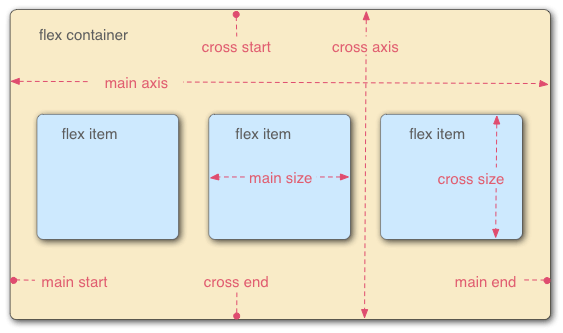
采用Flex布局的元素,称为Flex容器(flex container),简称”容器”。
它的所有子元素自动成为容器成员,称为Flex项目(flex item),简称”项目”。
容器默认存在两根轴:水平的主轴(main axis)和垂直的交叉轴(cross axis)。
主轴的开始位置(与边框的交叉点)叫做main start,结束位置叫做main end;
交叉轴的开始位置叫做cross start,结束位置叫做cross end。
项目默认沿主轴排列。单个项目占据的主轴空间叫做main size,占据的交叉轴空间叫做cross size。
flex container

容器的属性

  • flex-direction:决定主轴的方向(即项目的排列方向)

    1
    2
    3
    .box {
    flex-direction: row | row-reverse | column | column-reverse;
    }

    取值:

    • row(默认值):主轴为水平方向,起点在左端
    • row-reverse:主轴为水平方向,起点在右端
    • column:主轴为垂直方向,起点在上沿
    • column-reverse:主轴为垂直方向,起点在下沿
  • flex-wrap:默认情况下,项目都排在一条线(又称”轴线”)上。flex-wrap属性定义,如果一条轴线排不下,如何换行

    1
    2
    3
    .box {
    flex-wrap: nowrap | wrap | wrap-reverse;
    }

    取值:

    • nowrap(默认):不换行
    • wrap:换行,第一行在上方
    • wrap-reverse:换行,第一行在下方
  • flex-flow:是flex-direction属性和flex-wrap属性的简写形式,默认值为row nowrap

    1
    2
    3
    .box { 
    flex-flow: <flex-direction> <flex-wrap>;
    }
  • justify-content(常用):定义了项目在主轴上的对齐方式

    1
    2
    3
    .box {
    justify-content: flex-start | flex-end | center | space-between | space-around;
    }

    它可能取5个值,具体对齐方式与轴的方向有关。下面假设主轴为从左到右:

    • flex-start(默认值):左对齐
    • flex-end:右对齐
    • center:居中(常用)
    • space-between:两端对齐,项目之间的间隔都相等
    • space-around:每个项目两侧的间隔相等。所以,项目之间的间隔比项目与边框的间隔大一倍
  • align-items(常用):定义项目在交叉轴上如何对齐

    1
    2
    3
    .box {
    align-items: flex-start | flex-end | center | baseline | stretch;
    }

    它可能取5个值。具体的对齐方式与交叉轴的方向有关,下面假设交叉轴从上到下:

    • flex-start:交叉轴的起点对齐
    • flex-end:交叉轴的终点对齐
    • center:交叉轴的中点对齐
    • baseline: 项目的第一行文字的基线对齐
    • stretch(默认值):如果项目未设置高度或设为auto,将占满整个容器的高度
  • align-content:定义了多根轴线的对齐方式。如果项目只有一根轴线,该属性不起作用

    1
    2
    3
    .box {
    align-content: flex-start | flex-end | center | space-between | space-around | stretch;
    }

    属性可能取6个值:

    • flex-start:与交叉轴的起点对齐
    • flex-end:与交叉轴的终点对齐
    • center:与交叉轴的中点对齐
    • space-between:与交叉轴两端对齐,轴线之间的间隔平均分布
    • space-around:每根轴线两侧的间隔都相等。所以,轴线之间的间隔比轴线与边框的间隔大一倍
    • stretch(默认值):轴线占满整个交叉轴

项目(容器内的flex元素)的属性

  • order:定义项目的排列顺序。数值越小,排列越靠前,默认为0

    1
    2
    3
    .item {
    order: <integer>;
    }
  • flex-grow:定义项目的放大比例,默认为0,即如果存在剩余空间,也不放大

    1
    2
    3
    .item {
    flex-grow: <number>; /* default 0 */
    }

    如果所有项目的flex-grow属性都为1,则它们将等分剩余空间;
    如果一个项目的flex-grow属性为2,其他项目都为1,则前者占据的剩余空间将比其他项多一倍

  • flex-shrink:定义了项目的缩小比例,默认为1,即如果空间不足,该项目将缩小

    1
    2
    3
    .item {
    flex-shrink: <number>; /* default 1 */
    }

    如果所有项目的flex-shrink属性都为1,当空间不足时,都将等比例缩小
    如果一个项目的flex-shrink属性为0,其他项目都为1,则空间不足时,前者不缩小
    负值对该属性无效

  • flex-basis:定义了在分配多余空间之前,项目占据的主轴空间(main size)。它的默认值为auto,即项目的本来大小

    1
    2
    3
    .item {
    flex-basis: <length> | auto; /* default auto */
    }

    可以设为跟width或height属性一样的值(比如350px),则项目将占据固定空间

  • flex:flex属性是flex-grow(放大比例), flex-shrink(缩小比例) 和 flex-basis(分配空间前占的主轴空间)的简写,默认值为0 1 auto。后两个属性可选

    1
    2
    3
    .item {
    flex: none | [ <'flex-grow'> <'flex-shrink'>? || <'flex-basis'> ]
    }

    该属性有两个快捷值:auto (1 1 auto)none (0 0 auto)
    建议优先使用这个属性,而不是单独写三个分离的属性,因为浏览器会推算相关值

  • align-self:允许单个项目有与其他项目不一样的对齐方式,可覆盖align-items属性。默认值为auto,表示继承父元素的align-items属性,如果没有父元素,则等同于stretch

    1
    2
    3
    .item {
    align-self: auto | flex-start | flex-end | center | baseline | stretch;
    }

    该属性可能取6个值,除了auto,其他都与align-items属性完全一致

flex布局练习题

1
2
3
4
5
6
7
8
9
10
11
12
13
.flex {
display: flex;
width: 200px;
height: 100px;
}
.left {
flex: 3 0 50px;
background: red;
}
.right {
flex: 2 0 100px;
background: blue;
}
1
2
3
4
<div class="flex">
<div class="left"></div>
<div class="right"></div>
</div>

问:下列布局在页面上的宽度比是多少?

答:由于flex属性是flex-grow(放大比例), flex-shrink(缩小比例) 和 flex-basis(分配空间前占的主轴空间)的简写。先计算基础值,left占50,right占100,剩下50, 50按比例分配,left占3份,right占2份,所以left的宽度为50+505/3 = 80,right的宽度为100+505/2 = 120, left:right = 80:120=2:3。

2. CSS尺寸属性

CSS 尺寸 (Dimension) 属性允许你控制元素的高度和宽度。同样,它允许你增加行间距。

所有CSS尺寸属性:

  • height:设置元素的高度
  • width:设置元素的宽度
  • line-height:设置行高
  • max-height:设置元素的最大高度
  • max-width:设置元素最大宽度
  • min-height:设置元素的最小高度
  • min-width:设置元素最小宽度

3. CSS长度单位

基本信息:

  • 一些设置 CSS 长度的属性有 width, margin, padding, font-size, border-width, 等
  • 数字与单位之间不能出现空格。如果长度值为 0,则可以省略单位
  • 对于一些 CSS 属性,长度可以是负数
  • 有两种类型的长度单位:相对和绝对

绝对长度
绝对长度单位是一个固定的值,它反应一个真实的物理尺寸。绝对长度单位视输出介质而定,不依赖于环境(显示器、分辨率、操作系统等)

相对长度
相对长度单位指定了一个长度相对于另一个长度的属性。对于不同的设备相对长度更适用

4. position属性

指定一个元素(静态的,相对的,绝对或固定)的定位方法的类型。

元素可以使用的顶部,底部,左侧和右侧属性定位。然而,这些属性无法工作,除非是先设定position属性。他们也有不同的工作方式,这取决于定位方法。

position属性的五个值

  • static

    • HTML 元素的默认值,即没有定位,遵循正常的文档流对象
    • 静态定位的元素不会受到 top, bottom, left, right影响
  • relative

    • 相对定位元素的定位是相对其正常位置
    • 移动相对定位元素,但它原本所占的空间不会改变
    • 相对定位元素经常被用来作为绝对定位元素的容器块
  • fixed

    • 元素的位置相对于浏览器窗口是固定位置
    • 即使窗口是滚动的它也不会移动
    • Fixed定位使元素的位置与文档流无关,因此不占据空间
    • Fixed定位的元素和其他元素重叠
  • absolute

    • 绝对定位的元素的位置相对于最近的已定位父元素,如果元素没有已定位的父元素,那么它的位置相对于
    • absolute 定位使元素的位置与文档流无关,因此不占据空间
    • absolute 定位的元素和其他元素重叠
  • sticky

    • position: sticky; 基于用户的滚动位置来定位
    • 粘性定位的元素是依赖于用户的滚动,在 position:relativeposition:fixed 定位之间切换
    • 它的行为就像 position:relative; 而当页面滚动超出目标区域时,它的表现就像 position:fixed;,它会固定在目标位置
    • 元素定位表现为在跨越特定阈值前为相对定位,之后为固定定位
    • 这个特定阈值指的是 top, right, bottom 或 left 之一,换言之,指定 top, right, bottom 或 left 四个阈值其中之一,才可使粘性定位生效。否则其行为与相对定位相同

元素重叠情况

  • 元素的定位与文档流无关,所以它们可以覆盖页面上的其它元素
  • z-index属性指定了一个元素的堆叠顺序(哪个元素应该放在前面,或后面)
  • 一个元素可以有正数或负数的堆叠顺序
  • 具有更高堆叠顺序的元素总是在较低的堆叠顺序元素的前面

5. CSS伪元素

CSS伪元素是用来添加一些选择器的特殊效果。

伪类和伪元素区别

  • 伪类::hover, :active (元素状态)

    • CSS伪类是用来添加一些选择器的特殊效果。伪类选择元素基于的是当前元素处于的状态,或者说元素当前所具有的特性,而不是元素的id、class、属性等静态的标志。由于状态是动态变化的,所以一个元素达到一个特定状态时,它可能得到一个伪类的样式;当状态改变时,它又会失去这个样式
    • 注意考点:
      • 在CSS定义中,a:hover 必须被置于 a:link 和 a:visited 之后,才是有效的
      • 在CSS定义中,a:active 必须被置于 a:hover 之后,才是有效的
  • 伪元素:::after, ::before (创建虚拟元素)

    • 与伪类针对特殊状态的元素不同的是,伪元素是对元素中的特定内容进行操作,它所操作的层次比伪类更深了一层,也因此它的动态性比伪类要低得多
    • 实际上,设计伪元素的目的就是去选取诸如元素内容第一个字(母)、第一行,选取某些内容前面或后面这种普通的选择器无法完成的工作
    • 它控制的内容实际上和元素是相同的,但是它本身只是基于元素的抽象,并不存在于文档中,所以叫伪元素

6. CSS3动画

@keyframes 规则
@keyframes 规则是创建动画。
@keyframes 规则内指定一个 CSS 样式和动画将逐步从目前的样式更改为新的样式。
当在 @keyframes 创建动画,把它绑定到一个选择器,否则动画不会有任何效果。

CSS3动画

  • 动画是使元素从一种样式逐渐变化为另一种样式的效果
  • 请用百分比来规定变化发生的时间,或用关键词 “from” 和 “to”,等同于 0% 和 100%
  • 0% 是动画的开始,100% 是动画的完成。为了得到最佳的浏览器支持,应该始终定义 0% 和 100% 选择器

animation属性语法

1
animation: name duration timing-function delay iteration-count direction fill-mode play-state;

7. Grid布局

既然说了flex布局,下面来讲一下grid:

基本概念

  • 网格容器:所有网格元素的直接父元素,且上面要定义display:grid属性
  • 网格项:是网格容器的直接子元素(间接子元素就不属于网格项)
  • 网格线:组成网格结构的分割线,垂直或水平,位于行或列的任意一侧
  • 网格单元:两个相邻行和两个相邻列网格线之间的空间,是网格线的基本单位
  • 网格轨迹:两个相邻的网格线之间的间隔,可视为网格的行或列
  • 网格区域:四条线包围的总空间(例如行网格线1、3和列网格线1、3之间的网格区域)

容器的属性

  • display定义网格容器:grid & inline-grid